So, finally I have gotten some time on my hands and I am able to write a relatively longer blog post this time. Again, I apologize to my readers for not updating so frequently as I used to last month.
OK, so, in this one I'll be showing to those interested in fractals how to quickly make and render one with Incendia. It this tutorial I'll pretty much be covering the basics and the mandatory steps without going into much detail into the extra features of the program. Tho, later on on, if I have the time and I've decided there's enough interest on the subject, I'll make another tutorial about them too.
So the first thing you should do is, obviously
download and install the newest version of Incendia (the one I'm using) and start it up.
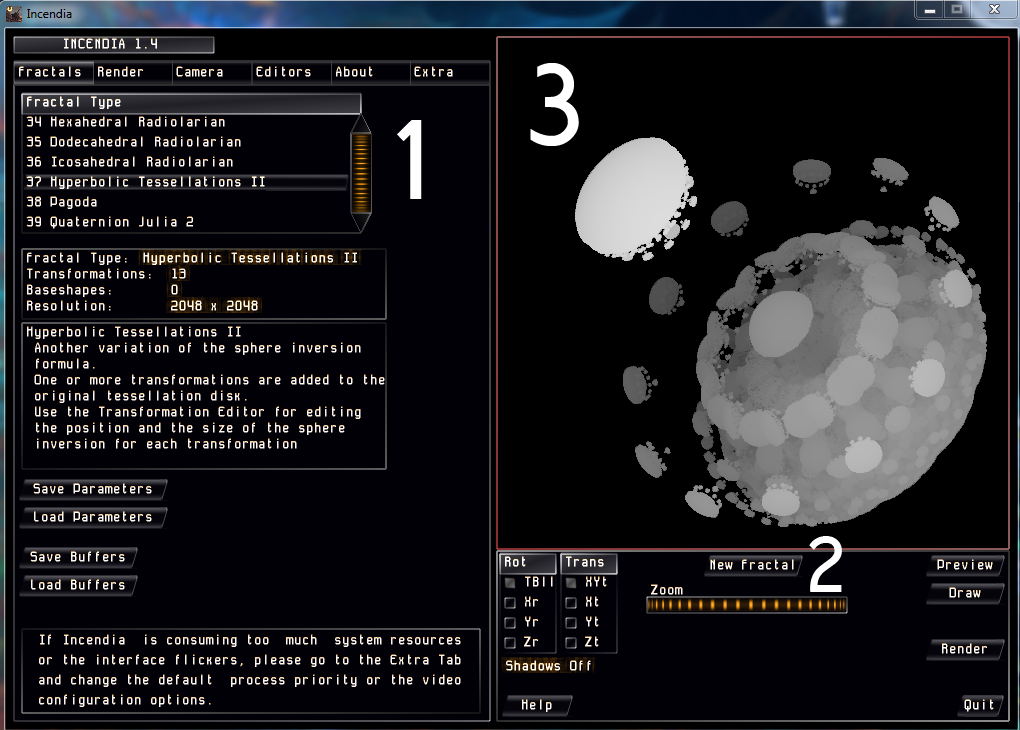
Upon doing so you should see the window pictured above. This is where you'll pick what kind of fractal you'll be rendering. What you'll want to do here is pick a fractal formula from the "Fractal Type" list (1) and then click "New Fractal" (2) which will randomize the shape. Repeat steps (1) and (2) until you get something you like.
By clicking on the display (3) and dragging the cursor you'll be able to rotate (left mouse button) or pan (right mouse button) the fractal. Zooming in and out is done by either the slider below of the scroll button on your mouse.
Next, go to the "Editors" tab (1) and click on "Edit" (2) and the on the "New" button (3). You'll see a whole bunch of stuff appear. Do not worry, as we'll use only the most important of them this time. Select the "Points" option (4) to see your fractal from the way you have set it to be. DO NOT TRY TO PAN OR ROTATE FROM HERE, as clicking and dragging do a completely different job here (which, again, won't be covered in this tutorial.).
Afterwards, explore and pick a baseshape from the list (5). This is the model that's going to be iterated, following your fractal's formula. By changing the value of the "Depth" slider (6) you choose how many times that shape will repeat itself. If you don't have a very powerful computer and/or enough time for rendering, I suggest keeping it below 10. When you're done it is very important to set the "Panels" option back to "Vector".
Now, go to the "Render" tab and click on the "Preview" button below the display (sorry, no number here). You will see a preview of your fractal, hence the name, with the applied default textures. Both the ambient lighting and diffuse reflection (1) have the same set of materials so feel free to play around with them until you find the perfect match for your 3D fractal.
After you're done head over to the "Camera" tab. Not much to do here, except change the light direction (1) and and the resolution and anti-aliasing of the final image you're going to export. As, you can see, I personally prefer to work with the highest possible and I suggest you do that too, because it doesn't affect the render time significantly. Now you can finally hit "Render" and watch the magic happen, as a fractal is being born.
After some time, it you've decided it's good enough, go back to the "Render" tab and export the result as an image file by either picking "Save Bitmap" or "Save PNG" (I personally prefer bitmap). Congratulations!!! You have just made your first fractal! Here is mine:
Thanks for reading! Hope you enjoyed it and goodnight!